
Your nights, organized the right way.
Tables, prices and bookings in one place.
Your PRs or customers handle them from their phone.
All the tables you want · Prices by category · Statistics and PDF export
“Who booked that table?”
Requests come in on three different chats, someone answers in person, a spreadsheet gets half updated. You know how it ends: tables given away twice, customers left standing at the entrance and a night nobody can give you the numbers for the next day.
With Clubby there's just one list, the same for you, the PRs and the till. Whoever takes a table removes it for everyone else, in the same instant.
Fewer messages, fewer spreadsheets, fewer surprises.
Clubby is the software that brings together your venue's tables, prices and bookings: one single list, always up to date, for you, your PRs and whoever's on the door.
You decide who books 01
PRs keep working the way they always have, entering tables for their customers. Or open bookings to the public and they come in on their own, even at three in the morning.
As many tables as you want 02
Ten, thirty, a hundred: add the tables you need, give each one the right category and price, and change everything when you change the room.
Your typical night, saved 03
You set up Saturday once. After that you change the date and you're ready to take bookings.
Everyone sees the same thing 04
You move a table, mark a free entry, cancel a booking: whoever's working sees it on their own phone, without having to call you.
for the night
The next day you have the numbers 05
How many tables sold, which categories sell best, how it went compared to the week before. All on one screen, with PDF export.
to last Saturday
Guest list and door check-in 06
Recurring and per-night guest lists, even from an Excel file. At the door, everyone who comes in gets checked off from a phone, guest list and tables: you know right away who was on the list and didn't show up.
actually showed up
Online presales 07
Sell presales for the night from your link: Women, Men, Discounted, each with its own price and spots. The customer pays by card and at the entrance they're already on the list, ready to check off with one tap.
Direct link with deposit 08
Share a link: the customer picks the night and table, enters their name and pays the deposit, at the percentage you choose. The table is confirmed only once the payment goes through; if they don't pay, it frees up on its own.
The night's numbers, ready to go.
How many tables each PR brings and how many actually show up, who got in at the door and who was on the list but didn't show, room occupancy and most requested tables.
All calculated automatically, night by night, with PDF export.
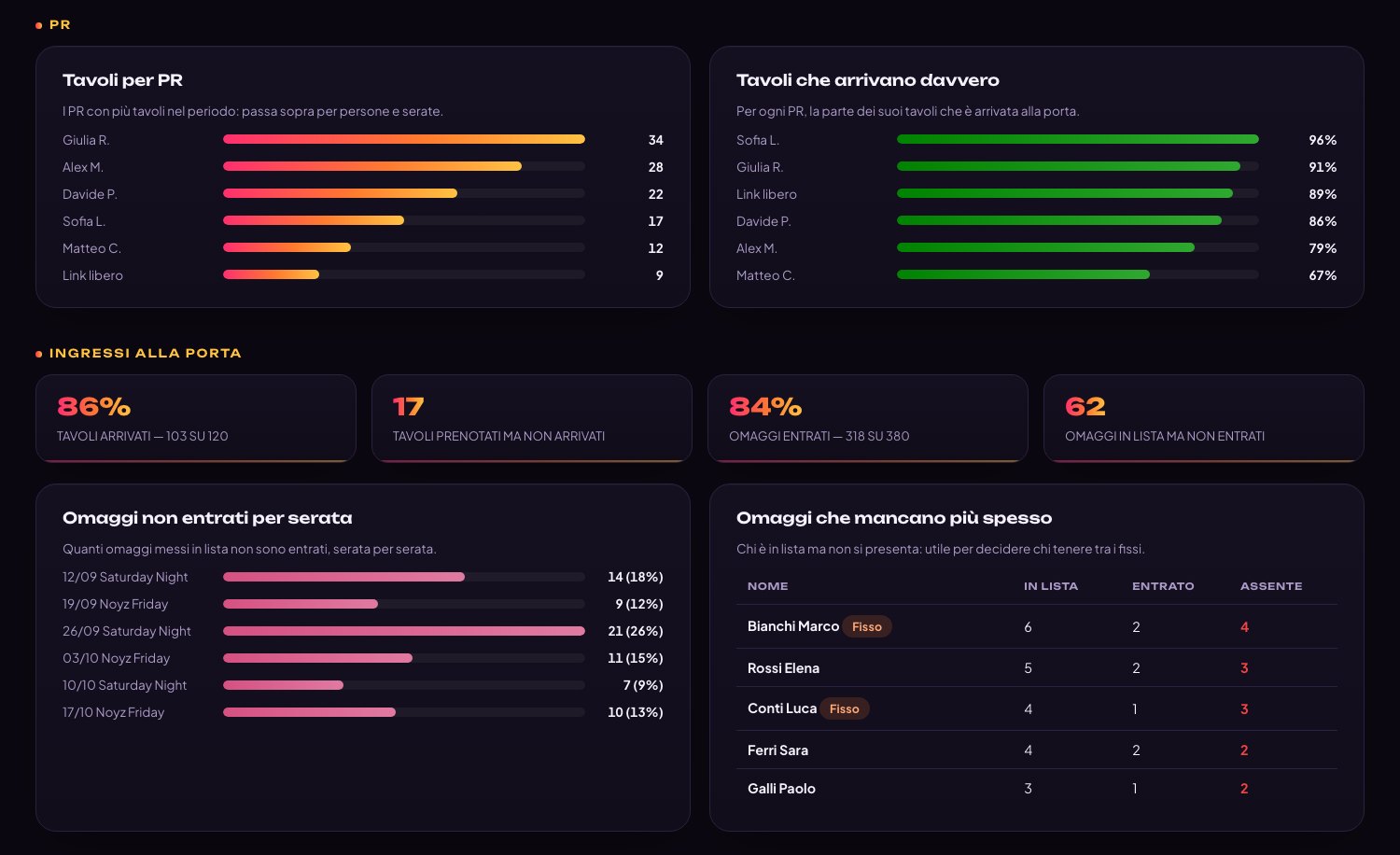
Five steps, from the idea for the night to the final numbers.
Create the event
Name, date, categories and prices. If it's an event you repeat every week, start from the saved template and you're done in a minute.
Set up the tables
Add as many tables as you need and give each one a category and price — dance floor, privé, high table or whatever you call them. If the room changes for an event, you only change that night.
Let the bookings come in
PRs enter them for their groups, or customers make them from their phone. Every table taken disappears right away from everyone's list.
On the night, from your phone
A group turns up bigger than expected, a table gets moved, a friend gets free entry: you update on the fly while the venue is busy, without chasing anyone.
Wrap up and take stock
As soon as the night ends you have statistics and PDF export ready: what worked, what didn't, what to focus on next Saturday.
One venue now, as many as you want tomorrow.
Events are organized into groups, each with its own managers. When you open a new venue you add it to the same platform, with its own tables, prices, staff and events: the two never overlap.
And everyone only sees what they need: whoever organizes the events can't touch the venue settings, whoever books only sees open events.
Your customers' phones show your name, not ours.
Logo, icon and colors are your venue's, on every screen.
And it installs like a real app without going through the app stores: customers keep it on their Home Screen and book the next night with one tap.

A few guys, a problem, an idea.
We've seen nights out from the inside. That's where Clubby was born.
The chaos
Tables across three different chats.
The idea
One list for everyone.
In the clubs
Built with the people who work in them.
Today
It grows with the people who use it.
“If you've lived the problem, you already know what the software has to do.”
— The Clubby teamYou pay for the tables you have, nothing else.
5 €per table, per month
The price is based on the tables in your room. PRs, customers, bookings and events aren't charged separately: however many you have, the fee doesn't change.
50%of the annual fee, one-off
Paid upfront when you sign: we build your venue's setup — room, tables, categories, prices and staff logins — so you reach your first night with everything already in place.
Prices exclude VAT.
What people ask us before getting started.
How many tables can I manage?
As many as your venue has: there's no fixed number. You add, rename and remove them whenever you like, and each table has its own category, seats and price. If the room changes for a special night, you change the setup just for that date.
Do I have to let customers book online?
No. You can leave everything in your PRs' hands and use Clubby just as a shared staff list. When you feel ready, open bookings to the public: it's a setting, not another program to learn.
Can I take deposits and sell presales?
Yes. From the booking link the customer can pay the table deposit, at the percentage you choose, and buy presales for the night. They pay by card on Nexi's secure page and the money goes straight to the venue: Clubby doesn't handle payments and takes no commission.
Do my PRs need to install anything?
The phone they already have is enough: Clubby opens in the browser and can be added to the Home Screen like an app. Everyone has their own login and only sees their group's events.
What happens to data from past events?
They stay in Clubby, event by event, with bookings and statistics. You can look back at them whenever you like and export them to PDF, for example to compare two seasons or to pass them to your accountant.
How long does it take to get started?
Just the time to load your venue's tables and prices: we usually do it together on a call. From the next night you're up and running, and the setup stays saved for every time after.
Next Saturday can be a lot simpler.
Tell us how many tables you have and how you work: we'll prepare a demo with your room, your prices and your categories, and show you a night from start to finish.